
Api DOC
1. Introduction
The Sochitel API enables secure, authenticated communication between clients and the Sochitel platform.
It uses signed HTTP requests based on the Internet-Draft:
Signing HTTP Messages,
specification.
Authentication is handled via RSA digital signatures to verify message integrity and source authenticity. Each request must include specific headers and be signed using your private RSA key.
1.1 Transaction lifecycle
Most of the transaction receive a final response within few seconds.
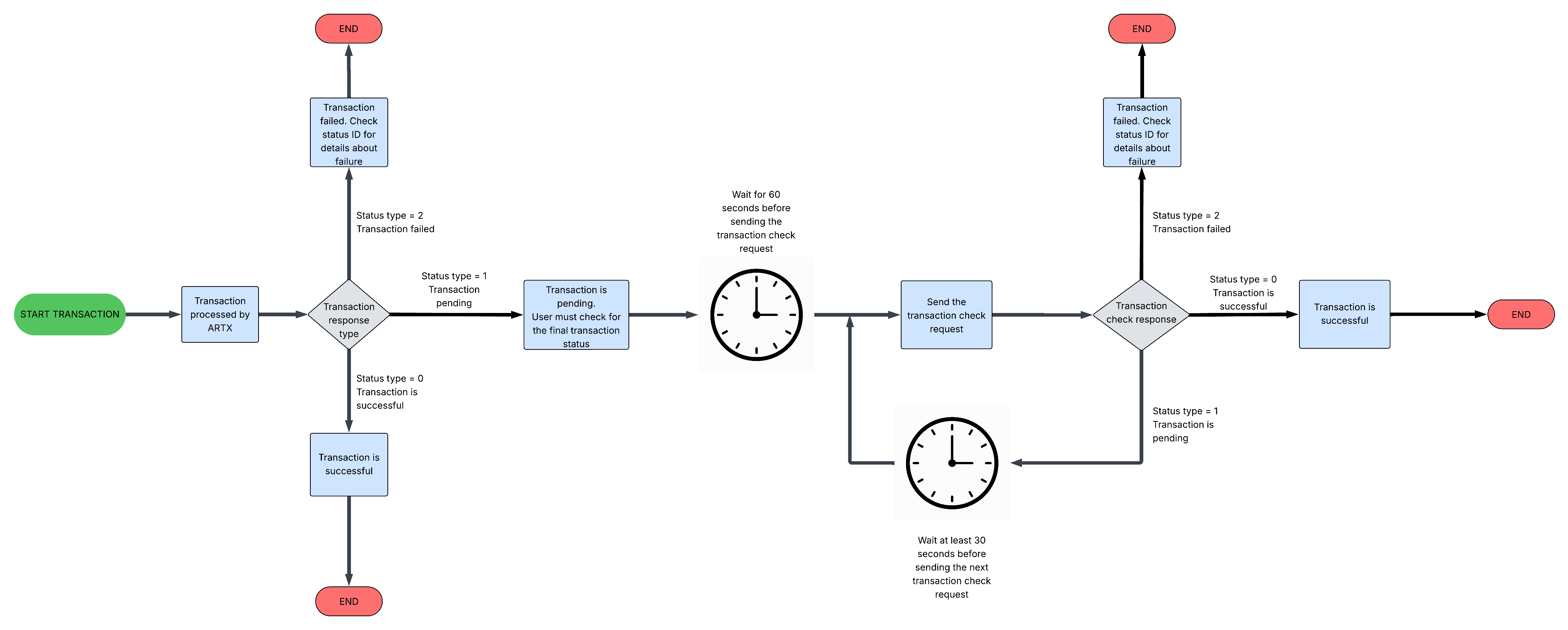
In certain situations, some operators may return a pending status. In these cases, the user should check the transaction status and wait for a final outcome before determining whether the transaction has failed or succeeded. The "Transaction Lifecycle Diagram" section includes a diagram that illustrates the various statuses a transaction can have during processing.
Pending statuses
There are 3 different pending statuses:
| Transaction status code | Status name | Description |
|---|---|---|
| 46 | In progress | The transaction has not yet completed |
| 9 | Transaction is pending | The transaction has been completed, however the remote operator hasn\’t returned a final status yet. The user has to keep checking the transaction status until a final status (success or failure) is returned. A transaction can take up to 20 minute to be settled. |
| 59 | Transaction is pending, manual verification required | The transaction has been completed, however the remote operator requires manual verification. Please contact support@sochitel.com for further information regarding the final transaction status |
Transaction lifecycle diagram
2. Authentication Guide
2.1 Generate RSA Keys
To use the API, you must first generate a 4096-bit RSA key pair. The public key certificate will be uploaded to the Sochitel client portal. Keep your private key secure.
$ openssl genrsa -out certificate.key 4096 $ openssl rsa -in certificate.key -outform PEM -pubout -out certificate.crt
The certificate.key will contain the private key, and certificate.crt the public certificate.
The public certificate has to be uploaded in the API configuration section on the web portal.
A certificate can be replaced via the API command 3.1 POST /newrsacert,
but the first certificate has to be uploaded on the web portal.
The web portal also allows to generate a key pair. Public certificate is automatically stored in the account configuration, whilst the private key is shown and has to be safely stored on client side. Web portal key generations should not be used with production systems, but it could come handy to set the first certificate, and then become able to set the new certificate via API call. Click HERE to generate RSA keys on the portal
2.2 Request date and nonce
The date of the request sent in the HTTP Date header must be accurate and sent in RFC 2822 format (example: Wed, 17 Feb 2021 22:21:39 +0000).
Every request must include a unique numeric nonce in the HTTP Nonce header. The nonce must be 18 digits long, with the first digit representing the day of the week in numeric form: 1 for Monday through 7 for Sunday, corresponding to the day the request is sent. Below is a sample PHP code to generate a valid nonce based on the current date.
$date = gmdate("r"); $nonce = gmdate("N"); for($i=0; $i<17; $i++) { $nonce .= random_int(0, 9); }
const crypto = require("crypto"); // Date in RFC 2822 format (GMT) // e.g., "Mon, 27 May 2025 13:45:00 GMT" const date = new Date().toUTCString(); console.log("Date:", date); // Nonce: day of week (1-7) + 17 random digits // 0 = Sunday -> convert to 7 const dayOfWeek = (new Date().getUTCDay() || 7).toString(); let nonce = dayOfWeek; for (let i = 0; i < 17; i++) { nonce += Math.floor(Math.random() * 10); } console.log("Nonce:", nonce);
import java.time.ZonedDateTime; import java.time.format.DateTimeFormatter; import java.time.ZoneOffset; import java.util.Random; public class NonceGenerator { public static void main(String[] args) { // Date in RFC 2822 format (GMT) ZonedDateTime now = ZonedDateTime.now(ZoneOffset.UTC); String date = now.format(DateTimeFormatter .RFC_1123_DATE_TIME); System.out.println("Date: " + date); // Nonce: day of week (1-7) + 17 random digits // 1 (Monday) to 7 (Sunday) int dayOfWeek = now.getDayOfWeek().getValue(); StringBuilder nonce = new StringBuilder(); nonce.append(dayOfWeek); Random random = new Random(); for (int i = 0; i < 17; i++) { nonce.append(random.nextInt(10)); // 0-9 } System.out.println("Nonce: " + nonce.toString()); } }
2.3 Calculate Digest
Requests must include the Base64-encoded digest of the payload, referred to as SHA256
(see Commands for more details).
For requests without a body (such as GET requests), the digest should be calculated using an empty string.
This digest must be included in the HTTP Digest header and will also be used for the signature
calculation described later. Below is a sample PHP code to generate a valid digest:
$payload = '{"key1":"value1"}';
$digest = "SHA-256=" . base64_encode(hash("sha256", $payload, true));
//Result is:
// "SHA-256=mHSFQkC0W0vb9D/KYRC6/OhSWu2+ylurruDLE32aeGg="
const crypto = require("crypto"); const payload = '{"key1":"value1"}'; const hash = crypto.createHash('sha256') .update(payload, 'utf8') .digest('base64'); const digest = `SHA-256=${hash}`; console.log(digest); // Should match PHP output
import java.nio.charset.StandardCharsets; import java.security.MessageDigest; import java.util.Base64; public class DigestExample { public static void main(String[] args) throws Exception { String payload = "{\"key1\":\"value1\"}"; MessageDigest digest = MessageDigest.getInstance("SHA-256"); byte[] hash = digest.digest(payload .getBytes(StandardCharsets.UTF_8)); String base64Hash = Base64.getEncoder().encodeToString(hash); String result = "SHA-256=" + base64Hash; System.out.println(result); // Should match PHP output } }
Calculate the digest from command line:
$ echo -e "{\"key1\":\"value1\"}\c" | openssl dgst -sha256 -binary | base64 mHSFQkC0W0vb9D/KYRC6/OhSWu2+ylurruDLE32aeGg=
2.4 Compose the string to be signed
The string that has to be signed with RSA must follow this format:
(request-target): method path host: hostname date: date nonce: nonce digest: digest
Rules:
- method: must be lower case, i.e. get
- path: must include all the query parameters, i.e. /api?id=12345
- date: the date of the request (Date HTTP Header) in RFC 2822 format, i.e. Wed, 17 Feb 2021 22:21:39 +0000
- nonce: the nonce generated in point 2.2
- digest: the digest calculated in point 2.3
- each row must follow the pattern "name-colon-space-value" and be terminated with the newline character (\n)
Example (no payload, digest calculated on an empty string):
(request-target): get /balance host: test.example.com date: Wed, 17 Feb 2021 22:21:39 +0000 nonce: 326966493408350986 digest: SHA-256=47DEQpj8HBSa+/TImW+5JCeuQeRkm5NMpJWZG3hSuFU=
2.5 RSA Sign the string
The string has to be signed with the private key created in point 2.1, using RSA (rsa-sha256) algorithm. The output has to be Base64 encoded
Sample PHP code to sign the string:
//Must contain the private key $rsaPrivateKey = "-----BEGIN PRIVATE KEY----- MIIJRAIBADANBgkqhkiG9w0BAQEFAASCCS4wggkqAgEAAoICAQC2uFepC6mBK6fl ... 0nlSMkmpDd9OJPqoZGKNo9oUXNeD5ubX -----END PRIVATE KEY-----"; //Signature $signatureData = "(request-target): get /balance\n" . "host: test.example.com\n" . "date: Wed, 17 Feb 2021 22:21:39 +0000\n" . "nonce: 326966493408350986\n" . "digest: SHA-256=47DEQpj8HBSa+/TImW+5JCeuQeRkm5NMpJWZG3hSuFU="; openssl_sign($signatureData, $signature, $rsaPrivateKey, OPENSSL_ALGO_SHA256); $signature = base64_encode($signature);
Calculate the signature from command line (assuming the RSA private key is stored in private.pem file):
$ echo -e "(request-target): get /balance\nhost: test.example.com\ndate: Wed, 17 Feb 2021 22:21:39 +0000\nnonce: 326966493408350986\ndigest: SHA-256=47DEQpj8HBSa+/TImW+5JCeuQeRkm5NMpJWZG3hSuFU=\c" | openssl dgst -sign private.pem -sha256 -binary | base64
2.6 Compose the Authorization header
The authorization header must follow this format:
Authorization: Signature keyId="UserID", algorithm="rsa-sha256", headers="(request-target) host date nonce digest", signature="signature"
Full request sample headers:
Host: test.example.com Date: Wed, 17 Feb 2021 22:21:39 +0000 Nonce: 326966493408350986 Digest: SHA-256=47DEQpj8HBSa+/TImW+5JCeuQeRkm5NMpJWZG3hSuFU= Authorization: Signature keyId="123456789", algorithm="rsa-sha256", headers=" (requesttarget) host date nonce digest", signature="UGA45YQVZr2oc ..... 3USfX+w="
3. Generic API responses
3.1 Generic success
A successful request is identified by HTTP Status 200 OK. An HTTP Status different than 200 OK identifies a failure. The minimum parameters included in a successful response are: Parameter: Fixed value errno: 0 error: Success Sample response {"errno":0,"error":"Success"} Other body parameters could be included depending on the command
3.2 Generic errors
API requests could fail because of generic errors not depending from the command. All the errors are sent with an HTTP Status different than 200 OK. List of generic error codes can be found in appendixes section.
The minimum parameters included in a failure are: Parameter: Description errno: Numeric error code (see and command details) error: Error description Sample response {"errno":2,"error":"Malformed Authorization Header"}
4. Commands
4.1 POST /newrsacert
The POST /newrsacert command can be used to replace the current RSA public certificate with a new one. If the request is successful, the response contains the new certificate that has been set
Sample request
POST /newrsacert HTTP/1.1
Host: test.example.com
Date: Wed, 17 Feb 2021 22:21:39 +0000
Nonce: 326...986
Digest: SHA-256=nDdj...OIk=
Authorization: Signature keyId="123456789", algorithm="rsa-sha256", headers="(requesttarget)host date nonce digest",
signature="pNcSG/BnzN ... AQM6/LtQio="
{
    "certificate":"-----BEGIN PUBLIC KEY-----\nMIICIjANB....lcR+5kCAwEAAQ==\n-----END PUBLIC KEY-----",
    "check":"TyG...NCk="
}
Successful response [HTTP Status 200 OK]
Parameter Description
certificate It contains the new RSA public certificate that has been set for the account
Sample response
{
    "errno":0,
    "error":"Success",
    "certificate": "-----BEGIN PUBLIC KEY-----\nMIICIjANB....lcR+5kCAwEAAQ==\n-----END PUBLIC KEY-----"
}
Sample error
{
    "errno":17,
    "error":"Invalid parameters",
    "message":["certificate","check"]
}
Command parameters Parameter Requirements Description certificate mandatory Must contain the new RSA public certificate. It has to start with -----BEGIN PUBLIC KEY----- and end with -----END PUBLIC KEY-----, and lines must end with the newline character \n. check mandatory Must contain the signature (Base64 encoded) of the new RSA public certificate calculated with the new RSA private key. This is a control to ensure the clients is able to sign a message with the new keys
Errors
| HTTP Status | Errno | Error | Message | Description |
|---|---|---|---|---|
| 400 Bad Request | 15 | Invalid Check | The certificate signature in the check parameter doesn't match | |
| 400 Bad Request | 17 | Invalid parameters | certificate, check | Array with the invalid parameters |
| 403 Forbidden | 16 | Operation failed | Failure when replacing the RSA public key | The new RSA public certificate can't be saved |
4.2 GET /balance
Sample request
GET /balance HTTP/1.1
Host: test.example.com
Date: Wed, 17 Feb 2021 22:21:39 +0000
Nonce: 326...986
Digest: SHA-256=nDdj...OIk=
Authorization: Signature keyId="123456789", algorithm="rsa-sha256", headers="(requesttarget) host date nonce digest", signature="pNcSG/BnzN ... AQM6/LtQio="
Sample response
{
    "errno":0,
    "error":"Success",
    "balance":"83.00",
    "currency":"GBP"
}
The GET /balance command can be used to retrieve the account's balance. Command parameters This command has no payload.
Successful response [HTTP Status 200 OK] Parameter Description balance Account's balance currency 3 characters ISO 4217 currency code of the account
4.3 GET /operators
Sample request #1 (full operators list)
GET /operators HTTP/1.1
Host: test.example.com
Date: Wed, 17 Feb 2021 22:21:39 +0000
Nonce: 326...986
Digest: SHA-256=nDdj...OIk=
Authorization: Signature keyId="123456789", algorithm="rsa-sha256", headers="(requesttarget) host date nonce digest", signature="pNcSG/BnzN ... AQM6/LtQio="
Sample request #2 (single operator)
GET /operators/1 HTTP/1.1
Host: test.example.com
Date: Wed, 17 Feb 2021 22:21:39 +0000
Nonce: 326...986
Digest: SHA-256=nDdj...OIk=
Authorization: Signature keyId="123456789", algorithm="rsa-sha256", headers="(requesttarget) host date nonce digest", signature="pNcSG/BnzN ... AQM6/LtQio="
Sample response #1 (without extra parameters)
{
    "errno": 0,
    "error": "Success",
    "operators": [
        {
            "id": "1",
            "name": "Operator 1",
            "country": "GB",
            "currency": "GBP",
            "productTypes": [
                "1"
            ],
            "products": [
                {
                    "id": "1",
                    "name": "Product 1",
                    "type": "1",
                    "category": "1.0",
                    "amount": {
                        "min": {
                            "operator": "10.00",
                            "user": "0.04"
                        },
                        "max": {
                            "operator": "50000.00",
                            "user": "186.55"
                        },
                        "type": "range"
                    },
                    "extraParameters": false
                }
            ]
        },
        {
            "id": "2",
            "name": "Operator 2",
            "country": "NG",
            "currency": "NGN",
            "productTypes": [
                "1",
                "4"
            ],
            "products": [
                {
                    "id": "2",
                    "name": "Product 2",
                    "type": "4",
                    "category": "4.0",
                    "amount": {
                        "min": {
                            "operator": "2000.00",
                            "user": "7.46"
                        },
                        "max": {
                            "operator": "2000.00",
                            "user": "7.46"
                        },
                        "type": "fixed"
                    },
                    "extraParameters": false
                }
            ]
        }
    ]
}
Sample response #2 (with extra parameters)
{
  "errno": 0,
  "error": "Success",
  "operators": [
    {
      "id": "1",
      "name": "Operator1",
      "country": "GB",
      "currency": "GBP",
      "productTypes": [
        "3"
      ],
      "products": [
        {
          "id": "1",
          "name": "Bill Payment Test",
          "type": "3",
          "category": "7.0",
          "amount": {
            "min": {
              "operator": "1.00",
              "user": "1.50"
            },
            "max": {
              "operator": "100.00",
              "user": "150.00"
            },
            "type": "range"
          },
          "extraParameters": {
            "accountType": {
              "name": "Account type",
              "tip":"Allowed values: PREPAID, POSTPAID",
              "values": [
                "PREPAID",
                "POSTPAID"
              ],
              "mandatory": true
            }
          }
        }
      ]
    }
  ]
}
The GET /operators command can be used to retrieve the available operators and their products. Including the operator ID in the request URL (i.e. GET /operators/123), it is possible to filter the list and only return the selected operator. Command parameters This command has no payload. The operator ID can be included in the URL (i.e. GET /operators/123) to get a single operator details.
Successful response [HTTP Status 200 OK]
| Parameter | Description |
|---|---|
| operators | An array containing the list of available operators |
Operator object structure
| Parameter | Description |
|---|---|
| id | Operator ID |
| name | Operator name |
| country | Operator country code (ISO 3166-1 alpha-2) |
| currency | Operator currency (3 characters ISO 4217 code) |
| productTypes[] |
An array with the list of types of products available
(see Product Types list)
|
| products[] | An array containing the list of available products |
Product object structure
| Parameter | Description |
|---|---|
| id | Product ID |
| name | Product name |
| type | Product type (see Product Types list) |
| category | Product category (see Product Categories list) |
| amount{} | An object containing the amount details |
| extraParameters{} | An object containing a list of extra parameter objects; boolean value false if the product has no extra parameters |
Amount object structure
| Parameter | Description |
|---|---|
| type | Amount type range: any amount allowed between a min and max values; fixed: only a fixed amount is allowed (min and max have same value) |
| min{} | Minimum allowed amount object |
| max{} | Maximum allowed amount object |
Allowed Amount object structure
| Parameter | Description |
|---|---|
| operator | Amount in operator's currency |
| user | Amount in user's currency |
Extra Parameter object structure
The key of the object is the name of the field, the value has a list of parameters to explain how to use the parameter.
| Parameter | Description |
|---|---|
| name | Name of the extra parameter |
| tip | Info about how to use the extra parameter |
| values | Array of allowed values; not set if any value is allowed |
| mandatory | Boolean value, the extra parameter is mandatory if true, optional if false |
Errors
| HTTP Status | Errno | Error | Message | Description |
|---|---|---|---|---|
| 400 Bad Request | 101 | Invalid operator | The specified Operator ID in the URL is not valid |
4.4 GET /msisdn
Sample request
GET /msisdn/441234567890 HTTP/1.1
Host: test.example.com
Date: Wed, 17 Feb 2021 22:21:39 +0000
Nonce: 326...986
Digest: SHA-256=nDdj...OIk=
Authorization: Signature keyId="123456789", algorithm="rsa-sha256", headers="(requesttarget) host date nonce digest", signature="pNcSG/BnzN ... AQM6/LtQio="
Sample response
{
    "errno": 0,
    "error": "Success",
    "original": "441234567890",
    "normalized": "441234567890",
    "isValid": true,
    "isForma": {
        "id": "GB",
        "alt": [
            "GB"
        ]
    },
    "operator": {
        "id": "1",
        "confidence": 0,
        "alt": [
            1,
            2,
            3
        ]
    }
}
The GET /msisdn command can be used to validate a phone number (MSISDN).
The phone number to be validated must be included in the request URL (i.e. GET /msisdn/441234567890).
Command parameters
This command has no payload.
The MSISDN to be validated must be included in the URL (i.e. GET /msisdn/441234567890).
Successful response [HTTP Status 200 OK]
| Parameter | Description |
|---|---|
| original | The original MSISDN, as included in the request |
| normalized | The normalized MSISDN, after general clean up (leading 0 or +, spaces, etc...) |
| isFormallyValid | Boolean result of the formal validation true: formal validation passed (valid country code, valid operator prefix, valid phone number length) false: formal validation failed |
| isValid | Boolean result of the general validation true: the number passed the formal validation, plus a valid operator for it has been found false: no operator found for the phone number |
| country{} | Country object |
| country.id | Phone number country code (ISO 3166-1 alpha-2) |
| country.alt[] | Array of the alternative country codes (ISO 3166-1 alpha-2) |
| operator{} | Operator object |
| operator.id | Operator ID for the phone number |
| operator.confidence | Confidence level on the correctness of the phone number operator 0: low confidence level 1: high confidence level |
| operator.alt[] | Array of the alternative operators |
Errors
| HTTP Status | Errno | Error | Message | Description |
|---|---|---|---|---|
| 400 Bad Request | 102 | Invalid recipient | The MSISDN in the URL not valid |
4.5 GET /account
Sample request
GET /account/1/ctv123456 HTTP/1.1
Host: test.example.com
Date: Wed, 17 Feb 2021 22:21:39 +0000
Nonce: 326...986
Digest: SHA-256=nDdj...OIk=
Authorization: Signature keyId="123456789", algorithm="rsa-sha256", headers="(requesttarget) host date nonce digest", signature="pNcSG/BnzN ... AQM6/LtQio="
Sample response
{
    "errno":0,
    "error":"Success",
    "accountId":"ctv123456",
    "accountStatus":"VALID",
    "customerNumber":"ctv123456 Doe"
}
The GET /account command can be used to lookup an account (i.e. Cable TV account). The Product ID and account number must be included in the request URL (i.e. GET /account/1/ctv123456)
Command parameters This command has no payload. The Product ID and account number must be included in the URL (i.e. GET /account/1/ctv123456, where the Product ID is 1 and the account is ctv123456). The Product ID is the ID of the product the account has to be lookup for.
Successful response [HTTP Status 200 OK]
| Parameter | Description |
|---|---|
| accountId | The Account ID as specified in the request |
| accountStatus | The status of the account, as returned by the operator |
| customerNumber | The customer number, as returned by the operator |
| customerName | The customer name, as returned by the operator |
Errors
| HTTP Status | Errno | Error | Message | Description |
|---|---|---|---|---|
| 400 Bad Request | 102 | Invalid recipient | The Account ID in the URL is not valid | |
| 400 Bad Request | 105 | Invalid product | The Product ID in the URL is not valid | |
| 404 Not Found | 18 | Not Found | Account not found, or account lookup not supported by the operator |
4.6 GET /esim
Sample request
GET /esim/1/123456789 HTTP/1.1
Host: test.example.com
Date: Wed, 17 Feb 2021 22:21:39 +0000
Nonce: 326...986
Digest: SHA-256=nDdj...OIk=
Authorization: Signature keyId="123456789", algorithm="rsa-sha256", headers="(requesttarget) host date nonce digest", signature="pNcSG/BnzN ... AQM6/LtQio="
Sample response
{
    "status": {
        "id": 0,
        "name": "Successful",
        "type": 0,
        "typeName": "Success"
    },
    "command": "esimBalance",
    "timestamp": 1754587632,
    "reference": 5523205850,
    "result": {
        "balance": [
            {
                "balance": 1,
                "status": "ACTIVE",
                "iccid": "89480100342323242212111"
            },
            {
                "balance": 3,
                "status": "ACTIVE",
                "iccid": "89480100342323242212111"
            },
            {
                "balance": 2,
                "status": "ACTIVE",
                "iccid": "89480100342323242212111"
            }
        ]
    }
}
The GET /esim command can be used to get the balance and active products on an eSim.. The Product ID and account number must be included in the request URL (i.e. GET /account/1/123456789)
Command parameters This command has no payload. The Product ID and eSim ICCID must be included in the URL (i.e. GET /esim/1/1234567890, where the Product ID is 1 and the eSim ICCID is 1234567890). The Product ID is the ID of the product used to activate the eSim.
Successful response [HTTP Status 200 OK]
| Parameter | Description |
|---|---|
| balance | eSim balance data. Array of objects. Each element of the array contains the details of the status, balance of each product loaded on the eSim |
Errors
| HTTP Status | Errno | Error | Message | Description |
|---|---|---|---|---|
| 400 Bad Request | 102 | Invalid recipient | The eSim ICCID in the URL is not valid | |
| 400 Bad Request | 105 | Invalid product | The Product ID in the URL is not valid | |
| 404 Not Found | 18 | Not Found | eSim not found, or eSim balance lookup not supported by the operator |
4.7 GET /transaction
Sample request #1 (with ARTX transaction ID)
GET /transaction/artx/123456789 HTTP/1.1
Host: test.example.com
Date: Wed, 17 Feb 2021 22:21:39 +0000
Nonce: 326...986
Digest: SHA-256=nDdj...OIk=
Authorization: Signature keyId="123456789", algorithm="rsa-sha256", headers="(requesttarget) host date nonce digest", signature="pNcSG/BnzN ... AQM6/LtQio="
Sample request #2 (with User Reference)
GET /transaction/user/testUserRef1234 HTTP/1.1
Host: test.example.com
Date: Wed, 17 Feb 2021 22:21:39 +0000
Nonce: 326...986
Digest: SHA-256=nDdj...OIk=
Authorization: Signature keyId="123456789", algorithm="rsa-sha256", headers="(requesttarget) host date nonce digest", signature="pNcSG/BnzN ... AQM6/LtQio="
Sample response
{
    "errno": 0,
    "error": "Success",
    "id": "123456789",
    "reference": "testUserRef",
    "date": "2021-03-11 17:28:34",
    "operator": {
        "id": "1",
        "currency": "GBP",
        "reference": "abcdefghi"
    },
    "product": "1",
    "recipient": "441234567890",
    "amount": {
        "user": "2.92",
        "operator": "2.50"
    },
    "pin": {
        "number": "",
        "serial": ""
    },
    "instructions": "",
    "status": {
        "id": "0",
        "type": 0
    }
}
The GET /transaction command can be used to retrieve a previously executed transaction. This command can be used to check the final status of a transaction that was initially pending. The transaction's reference type and ID must be included in the request URL (i.e. GET /transaction/artx/123456789).
Command parameters This command has no payload. The transaction reference type must be included in the URL and could be either:
Successful response [HTTP Status 200 OK]
| Parameter | Description |
|---|---|
| id | ARTX transaction ID |
| reference | User Reference, as set by the user in the original transaction request |
| date | Transaction date and time |
| operator{} | Operator object |
| operator.id | Operator ID |
| operator.currency | Operator currency (3 characters ISO 4217 code) |
| operator.reference | Transaction operator reference (if returned by the operator, it may be empty) |
| product | product ID |
| recipient | Transaction recipient (i.e. the phone number that has been topped up) |
| amount{} | Amount object |
| amount.user | Amount charged to the user (in user's currency) |
| amount.operator | Amount sent to the operator (in operator's currency) |
| pin{} | PIN object; boolean value false if the transaction has no PIN details |
| pin.number | PIN number (set only if relevant for the product) |
| pin.serial | PIN serial (set only if relevant for the product) |
| instructions | Transaction instructions (if relevant for the product, it may be an empty string) |
| status | Transaction status (see Transactions error codes) |
Errors
| HTTP Status | Errno | Error | Message | Description |
|---|---|---|---|---|
| 400 Bad Request | 103 | Invalid transaction reference type | The request doesn't include a valid transaction reference type (artx or user) | |
| 400 Bad Request | 104 | Invalid transaction reference ID | The request doesn't include a valid transaction ID (i.e. missing transaction ID or non-numeric ARTX transaction ID) | |
| 404 Not Found | 18 | Not Found | The transaction was not found |
4.8 POST /transaction
Sample request #1 (without extra parameters)
POST /transaction HTTP/1.1
Host: test.example.com
Date: Wed, 17 Feb 2021 22:21:39 +0000
Nonce: 326...986
Digest: SHA-256=nDdj...OIk=
Authorization: Signature keyId="123456789", algorithm="rsa-sha256", headers="(requesttarget) host date nonce digest", signature="pNcSG/BnzN ... AQM6/LtQio="
{
    "operator":"1",
    "product":"1",
    "recipient":"447491234567",
    "amount":"5",
    "currency":"GBP",
    "reference":"sdsf34354"
}
Sample request #2 (with extra parameters)
POST /transaction HTTP/1.1
Host: test.example.com
Date: Wed, 17 Feb 2021 22:21:39 +0000
Nonce: 326...986
Digest: SHA-256=nDdj...OIk=
Authorization: Signature keyId="123456789", algorithm="rsa-sha256", headers="(requesttarget) host date nonce digest", signature="pNcSG/BnzN ... AQM6/LtQio="
{
    "operator":"1",
    "product":"1",
    "recipient":"447491234567",
    "amount":"5",
    "currency":"GBP",
    "reference":"test20",
    "extraParameters":{
        "accountType":"PREPAID",
        "meterNumber":"123",
        "orderId":"324"
    }
}
Sample response
{
    "errno":0,
    "error":"Success",
    "id":1234567890,"operator": {
        "id":"1",
        "currency":"GBP",
        "reference":"opRef123",
        "hint":false
    },
    "product":"1",
    "recipient":"447491234567",
    "amount": {
        "user":"6.25",
        "operator":"5.00"
    },
    "reference":"test201",
    "pin":{
        "number":"1234567890123456",
        "serial":"ABCDE123456"
    },
    "instructions":"How to redeem PIN",
    "balance":"29.44",
    "status":0
}
Sample error #1 (missing or formally invalid parameters in the request)
{
    "errno":17,
    "error":"Invalid parameters",
    "message":[
        "operator",
        "product",
        "recipient",
        "amount",
        "currency",
        "reference"
    ]
}
Sample error #2 (duplicate reference)
{
    "errno":104,
    "error":"Invalid transaction reference ID",
    "message":"Duplicate reference"
}
Sample error #3 (insufficient balance)
{
    "errno":110,
    "error":"Insufficient balance"
}
Sample error #4 (error on operator side, response include a transaction ID with transaction status)
{
    "errno":16,
    "error":"Operation failed",
    "id":1234567890,
    "operator":{
        "id":"1",
        "currency":"GBP",
        "reference":"",
        "hint":false
    },
    "product":"1",
    "recipient":"447491234567",
    "amount":{
        "user":"6.53",
        "operator":"5.00"
    },
    "reference":"test150",
    "pin":false,
    "instructions":"",
    "balance": "0.00"
}
Sample error #5 (extraParameters missing in the request)
Transaction status 68 means Missing parameters (see Transactions error code).
The message key includes the list of missing parameters.

{
    "errno":16,
    "error":"Operation failed",
    "id":1234567890,
    "operator":{
        "id":"1",
        "currency":"GBP",
        "reference":"",
        "hint":false
    },
    "product":"1",
    "recipient":"447491234567",
    "amount":{
        "user":"6.53",
        "operator":"5.00"
    },
    "reference":"test150",
    "pin":false,
    "instructions":"",
    "balance":false,
    "sta": ["accountType","meterNumber"]
}
The POST /transaction command can be used to execute a transaction. If the request is successful, the response contains the transaction details. A transaction record is created only if the request is fully valid and allowed (i.e. valid operator, product amount and destination, and the user has enough funds to pay for the transaction). A transaction ID is returned only when the transaction is created.
Command parameters
| Parameter | Requirements | Description |
|---|---|---|
| operator | mandatory | Operator ID |
| product | mandatory | Product ID |
| recipient | mandatory | Phone number or Account ID to be recharged Phone number must be entered in international format, without leading + or 0 (i.e. 447491234567) |
| amount | mandatory | Transaction amount |
| currency | mandatory | Amount currency (3 characters ISO 4217 code) It could be either the Operator currency or the User currency |
| reference | mandatory | Transaction user reference. It can be used to retrieve the transaction details in case no response is received to the POST /transaction request. Only alphanumeric characters are allowed (a-z, A-Z, 0, 9). The value is case sensitive (i.e. 123abc is the same of 123Abc). Max. 30 characters. |
| extraParameters | optional |
An object containing the extra parameters.
The extraParameters object is a list of key-value pairs, where the key is the extra
parameter name (as returned by the GET /operators command), and the value is the
extra parameter value.
Some bill payment operators and products require extra parameters (i.e. the meter
number or the account type). The required extra parameters are returned in the product object in the GET /operators response. |
Successful response [HTTP Status 200 OK]
| Parameter | Description |
|---|---|
| id | ARTX transaction ID |
| operator{} | Operator ID |
| operator.id | Operator ID |
| operator.currency | Operator currency (3 characters ISO 4217 code) |
| operator.reference | Transaction operator reference (if returned by the operator, it may be empty) |
| operator.hint | It could contain a suggestion for the recipient's correct operator in case of status code 3 Invalid destination. Boolean value false if no suggestion is available. |
| product | product ID |
| recipient | Transaction recipient (i.e. the phone number that has been topped up) |
| amount{} | Amount object |
| amount.user | Amount charged to the user (in user's currency) |
| amount.operator | Amount sent to the operator (in operator's currency) |
| reference | Transaction User Reference |
| pin{} | PIN object; boolean value false if the transaction has no PIN details |
| pin.number | PIN number (set only if relevant for the product) |
| pin.serial | PIN serial (set only if relevant for the product) |
| instructions | Transaction instructions (if relevant for the product, it may be an empty string) |
| balance | User account balance after the top up. Boolean value false if the transaction is failed. |
| status | Transaction status (see Transactions error codes) |
Errors
| HTTP Status | Errno | Error | Message | Transaction created | Description |
|---|---|---|---|---|---|
| 400 Bad Request | 17 | Invalid parameters | operator, product, recipient... | No | Array with the invalid parameters |
| 400 Bad Request | 101 | Invalid Operator | The operator is not valid | ||
| 400 Bad Request | 105 | Invalid product | No | The product is not valid | |
| 400 Bad Request | 106 | Invalid currency | No | The currency is not valid currency could be either the operator's currency or the user's currency | |
| 400 Bad Request | 107 | Invalid amount | No | The amount is not valid (i.e. out of range, or the amount doesn't match with the product) | |
| 400 Bad Request | 102 | Invalid recipient | No | The recipient is invalid | |
| 400 Bad Request | 104 | Invalid transaction reference ID | Duplicate reference | No | The reference is not valid. If the reason is the reference has already been used, the message parameter is Duplicate reference |
| 403 Forbidden | 108 | Recipient has pending transaction | No | recipient has a pending or in progress transaction | |
| 503 Service Unavailable | 109 | Operator congestion | No | The operator is congested, please try again in 1 minute | |
| 403 Forbidden | 110 | Insufficient balance | No | The user has not enough funds to pay for the transaction | |
| 403 Forbidden | 111 | Contact support | No | The user has to contact the support | |
| 503 Service unavailable | 16 | Operation failed | No | Generic error when processing the request | |
| 500 Internal server error | 16 | Operation failed | May include extra info about the failure | Yes |
Request is formally valid and transaction has been created, but it failed.
Check the status key for the reason of the failure
(see transaction error code).
Check the message key for extra info (if available).
|
5. Appendixes
5.1 Generic error codes
List of generic error codes.
| HTTP Status | Errno | Error | Description |
|---|---|---|---|
| 500 Internal server error | 1 | Not completed | Something went wrong when handling the request and the process has been terminated abnormally |
| 400 Bad Request | 2 | Malformed Authorization header | The Authorization header is malformed |
| 401 Unauthorized | 3 | Invalid Authorization keyId | The keyId is not valid |
| 400 Bad Request | 4 | Invalid Authorization Algorithm | The signature algorithm is not valid or allowed |
| 400 Bad Request | 5 | Invalid Authorization headers | The headers part of the Authorization header is not valid |
| 400 Bad Request | 6 | Invalid Digest | The digest format and/or algorithm are not valid |
| 401 Unauthorized | 6 | Invalid Digest | The digest is not valid for the current payload |
| 400 Bad Request | 7 | Invalid Nounce | The nonce is not valid |
| 400 Bad Request | 8 | Invalid Date | The request date is not valid |
| 401 Unauthorized | 9 | Invalid Signature | The signature is wrong |
| 401 Unauthorized | 10 | Unauthorized IP Address | The account has restrictions on the source IP Address, and the requesting IP Address is not allowed |
| 400 Bad Request | 11 | Malformed Payload | Payload is not valid |
| 400 Bad Request | 12 | Invalid Command | The command is not valid |
| 405 Method Not Allowed | 13 | Invalid Method | The selected HTTP method is not valid or supported |
| 405 Method Not Allowed | 14 | Invalid Command Method | The command doesn't support the selected HTTP method |
| 400 Bad Request | 15 | Invalid Check | The command required a check parameter, and the received value doesn't match with the expected one |
| 403 Forbidden | 16 | Operator Failed | A failure occurred when processing the request. A message parameter may be included in the body with extra details |
| 400 Bad Request | 17 | Invalid Parameters | A required parameter is missing or formally invalid. A message parameter may be included in the body with the array of invalid parameters |
| 404 Not Found | 18 | Not Found | Record or resource not found |
| 500 Internal Server Error | 999 | Unknown Error | Something went wrong when processing the request |
5.2 Transaction error types
List of transaction error types
| Error Type | Description |
|---|---|
| 0 | Success: the command has been executed successfully |
| 1 | Pending: the command status is not final, refer to command description for information about how to check for the final status |
| 2 | Failure: an error occurred during command execution |
5.3 Transaction error codes
List of transaction error codes
| Error Code | Error Type | Description | Action to take |
|---|---|---|---|
| 0 | 0 | Successful | None |
| 1 | 2 | Unknown Error | Try again |
| 2 | 2 | Invalid Operator | Try again using the right operator |
| 3 | 2 | Invalid destination | Try again using the right operator or a valid phone number |
| 4 | 2 | Invalid amount | Use the right amount range |
| 6 | 2 | Operator error | Try again |
| 7 | 2 | Destination is barred | Use a phone number which is not barred |
| 8 | 2 | Destination is inactive | Use a phone number which is not inactive |
| 9 | 1 | Transaction is pending | Call the get transaction command/endpoint |
| 13 | 2 | Insufficient balance | Contact Sochitel Support for account funding |
| 14 | 2 | Unknown error, please contact support | Contact Sochitel Support |
| 15 | 2 | Invalid user reference | Use a unique user reference that contains valid characters |
| 20 | 2 | Invalid currency | Ensure you are using the currency of thte user account or currency of the operator |
| 24 | 2 | Recharge fail | Try again |
| 27 | 2 | Service error | Contact Sochitel Support |
| 29 | 2 | Connection to operator temporarily down | Contact Sochitel Support |
| 32 | 2 | Destination is temporary blocked | The end user/client should reach out to the network operator to find out the reason |
| 35 | 2 | Recharge fail, try again in 15 minutes | Try again in 15 minutes time |
| 36 | 2 | Recharge rejected | Check payload (issue is most likey with the phone number) |
| 37 | 2 | Daily limit exceeded | Contact Sochitel Support |
| 39 | 2 | PIN not available | Contact Sochitel Support |
| 41 | 2 | Transaction abandoned | Contact Sochitel Support on status of the transaction |
| 42 | 2 | Weekly limit exceeded | Contact Sochitel Support |
| 43 | 2 | Monthly limit exceeded | |
| 46 | 1 | In progress | In progress, please wait |
| 48 | 2 | Communication error | Contact Sochitel Support |
| 50 | 2 | Communication error, please contact support | Contact Sochitel Support |
| 53 | 2 | Invalid product amount | Supply a valid product amount, if it is a fixed product, supply the exact amount, if it is a range product supply an amount within the minimum and maximum range of that product |
| 56 | 2 | Invalid user | Contact Sochitel Support |
| 57 | 2 | Invalid product | Ensure product is properly configured |
| 58 | 2 | System down for maintenance | Contact Sochitel Support |
| 59 | 2 | Transaction is pending, manual verification required | Contact Sochitel Support |
| 60 | 2 | Transaction rejected, try again in 5 minutes | Try again in 5 minutes |
| 61 | 2 | Transaction rejected, try again in 1 hour | Try again in 1 hour |
| 63 | 2 | Destination has a pending transaction | The customer has sent a request for a destination that already has a transaction in progress or pending. Destinations can only have one transaction in progress/pending at a time. Wait till the final status is gotten |
| 65 | 2 | Password update required | The password needs to be update in the Sochitel web portal |
| 66 | 2 | Congestion control, try again in 1 minute | Too many "in progress" transactions for the same operator - Wait a while |
| 67 | 2 | Payment failed | Contact Sochitel Support |
| 68 | 2 | Missing parameters | Include all extra parameters required |
| 70 | 2 | Operator unreachable | Contact Sochitel Support |
| 71 | 2 | No response from operator | Contact Sochitel Support |
| 72 | 2 | Account not found or lookup not available | The information for that particular account was not found |
| 73 | 2 | Access denied, certificate required | Contact Sochitel Support |
| 74 | 2 | Destination is post-paid, not supported | Contact Sochitel Support |
| 75 | 2 | Destination formally wrong | Use a valid phone number in international format |
| 76 | 2 | Account not found | The details for that particular account was not found |
| 77 | 2 | Invalid Code | Ensure that the code being used is valid |
5.4 Product types
List of product types
| Product Type | Description |
|---|---|
| 1 | Mobile Top Up |
| 2 | Mobile PIN |
| 3 | Bill Payment |
| 4 | Mobile Data |
5.5 Product categories
List of product categories
| Product Category | Description |
|---|---|
| 1.0 | Mobile Top Up |
| 2.0 | Mobile PIN |
| 3.0 | Bill Payment |
| 4.0 | Mobile Data |
| 4.1 | Mobile Data > Daily Bundles |
| 4.2 | Mobile Data > 7-14 Day Bundles |
| 4.3 | Mobile Data > Monthly Bundles |
| 4.4 | Mobile Data > Extended Validity Bundles |
| 4.5 | Mobile Data > Special Offers |
| 4.6 | Mobile Data > SME Data Share Bundles |
| 5.0 | Voice, Data & Combo Bundles |
| 6.0 | Internet Services |
| 7.0 | Cable TV |
| 8.0 | Utilities |
| 8.1 | Utilities > Electricity |
| 8.2 | Utilities > Water |
| 8.3 | Utilities > Transport & Toll Payment |
| 9.0 | Betting |
| 10.0 | Taxes |
| 10.1 | Taxes > Federal |
| 10.2 | Taxes > State |
| 11.0 | Lifestyle |
| 11.1 | Lifestyle > Education |
| 11.2 | Lifestyle > Healthcare |
| 11.3 | Lifestyle > Insurance |
| 12.0 | Retail Gift Cards |
| 13.0 | eVouchers |
| 14.0 | eSIM |
5.6 Network protocol
ARTX service is reachable only via encrypted HTTPS connection. No plaintext HTTP connection is allowed.
Allowed protocols:
- TLS 1.2
- TLS 1.3
Older TLS/SSL protocols are not supported.
Allowed ciphers:
- TLS_AES_256_GCM_SHA384 (0x1302)
- TLS_CHACHA20_POLY1305_SHA256 (0x1303)
- TLS_AES_128_GCM_SHA256 (0x1301)
- TLS_ECDHE_RSA_WITH_CHACHA20_POLY1305_SHA256 (0xcca8)
- TLS_ECDHE_RSA_WITH_AES_128_GCM_SHA256 (0xc02f)
- TLS_ECDHE_RSA_WITH_AES_256_GCM_SHA384 (0xc030)
- TLS_DHE_RSA_WITH_AES_128_GCM_SHA256 (0x9e)
- TLS_DHE_RSA_WITH_AES_256_GCM_SHA384 (0x9f)
As in any HTTPS connection, it’s up to the client do choose which protocol and ciphers to use, among the supported ones.