Sochitel API Documentation
Overview
Welcome to Sochitel/Nomiworld Developer Sandbox portal and API documentation. Our portal offers various tools to help support your business and provide all the documentation and tools you need to seamlessly integrate with us and immediately simulate live transactions so that you can focus on other important things.
Our API is user-friendly, secure, and reliable, ensuring an optimal experience providing developers access to our technology and hundreds of brands in our products catalogue.
This guide will help you get started with our API, providing step-by-step instructions and examples to make the integration process smooth and straightforward. You'll find all the information you need to get up and running quickly.
Getting Started
To start exploring and leveraging the full potential of our API, we've provided a set of quick links to guide you through the steps.
Access Credentials
The authentication is based on Internet-Draft
Signing HTTP Messages,
that allows to server and client to simultaneously add strong authentication and message integrity
to HTTP messages by using a digital signature.
An RSA key pair can be generated with the openssl command. The key should be 4096 bits. Longer keys are allowed but they'll unnecessarily increase the processing time. Shorter keys are allowed but they could not guarantee a proper security level.
RSA keys generation has to be done only once, or when the RSA keys want to be replaced by a new pair.
To keep security at a good level it is advisable to replace the key pair every 6 months. Anyway, this
is only a recommendation and there are no restrictions on how long a key pair is used.
Simulate Transactions
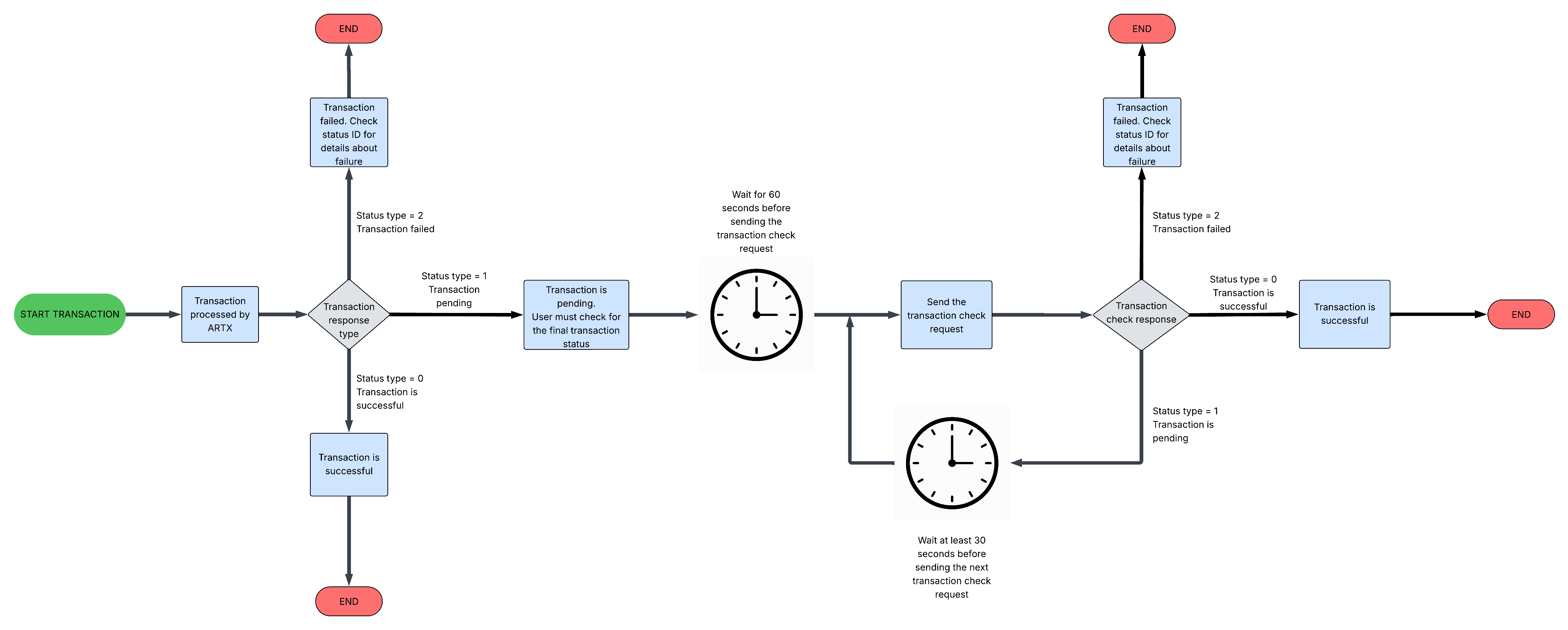
Simulating transaction involves basically two endpoints and HTTP methods - /GET and /POST.
The GET /transaction command can be used to retrieve a previously executed transaction. This command can be used to check the final status of a transaction that was initially pending. The transaction's reference type and ID must be included in the request URL (i.e. GET /transaction/artx/123456789).
The POST /transaction command can be used to execute a transaction. If the request is successful, the response contains the transaction details. A transaction record is created only if the request is fully valid and allowed (i.e. valid operator, product amount and destination, and the user has enough funds to pay for the transaction).
A transaction ID is returned only when the transaction is created.
Products Page
Take a look at our amazing selection of over 4,000 products! We're sure you'll find the perfect fit for your business model and the needs of your customers.